
eLearning Template Design System
A scalable design system created to improve consistency, usability, and development efficiency across eLearning projects.
Confidentiality Note
Due to confidentiality requirements, specific organization details, program names, and course materials are not shown. Project details focus on design approach, process, and outcomes.

Audience:
Instructional designers and eLearning developers
Format:
Captivate and Storyline templates, interaction library, and documentation
Tools:
Adobe Captivate, Articulate Storyline, Microsoft Office
Role:
Project Lead
The Problem
Existing templates lacked consistency and did not support the range of interaction designers needed.
As a result:
Visual design and structure varied across courses
Designers spent time branding and recreating interactions
Development workflows were inefficient
The Solution
I led the design and implementation of a scalable eLearning template system, transforming templates into reusable design assets.
The system enabled designers across the organization to build consistent, high-quality learning experiences.
It included:
Reusable interaction components and templates (Captivate and Storyline)
Standardized layouts and design patterns
A centralized interaction library
Clear documentation and implementation guidance
I partnered closely with leadership and cross-functional teams to align priorities, define requirements, and ensure adoption across the organization.
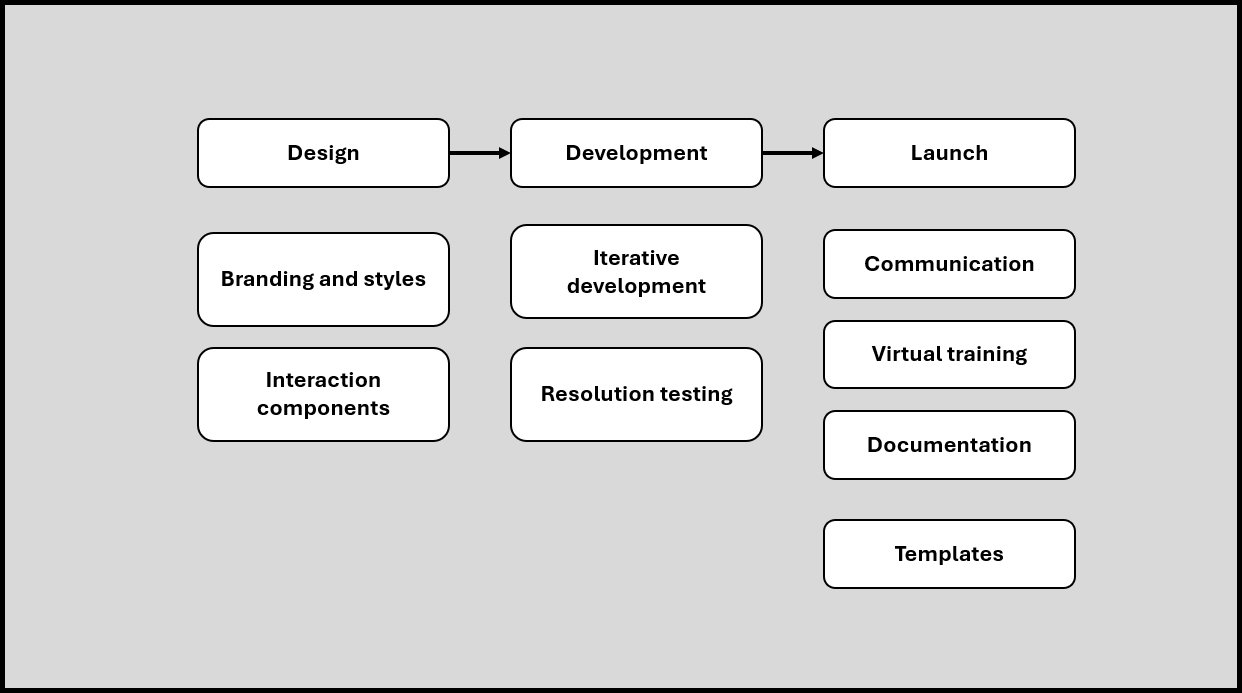
Design approach
This project focused on building a scalable template system designers could use consistently and independently.
Community-Driven Design
Gathered feedback from Captivate and Storyline communities of practice to ensure templates reflected real design needs and workflows.
Reusable Interaction System
Introduced an interaction library that reduced the need to rebuild common interactions and improved development speed.
Consistency Through Design Standards
Structured templates to reinforce consistent layout, branding, and user experience across projects.
Scalable Development
Reusable components reduced the need to recreate interactions, improving development speed and efficiency.
Documentation and Guidance
Supporting documentation helped designers understand how to use templates and apply design standards effectively.
Accessibility by Design
To support new accessibility requirements, I contributed to the design and validation of accessible eLearning templates in Captivate Classic.
At the time, formal accessibility processes and standards were still being established. Designers were new to accessibility, and there was no consistent approach for building compliant content.
I helped bridge that gap by:
Researching and testing how to make Captivate interactions and quiz components accessible
Building and validating a test project to identify accessibility gaps
Partnering with accessibility specialists and participating in ongoing working sessions
Synthesizing findings and sharing recommendations with project leads
Creating supporting assets, including accessible audio controls and SVG icons

Impact on Design and Development
Key improvements in how designers built and delivered learning experiences:
Clear Design Standards
Defined patterns helped designers apply layouts and interactions correctly and confidently.
Faster Onboarding for Designers
New designers could get started quickly using structured templates and examples.
Stronger Team Alignment
Shared resources and guidance ensured consistency across projects and contributors.
Faster Development
Designers built interactions more quickly without recreating common components.
Consistent Experiences
Courses followed consistent layout, branding, and interaction patterns across teams.
Reusable Components
Templates and shared assets reduced duplication and made updates easier over time.
Leadership & Collaboration
As project lead, I drove alignment across a cross-functional effort involving designers, managers, and stakeholders.
Gathered input from communities of practice to ensure templates reflected real design needs
Defined priorities, risks, and a clear task plan in collaboration with leadership
Facilitated regular working sessions to align contributors and maintain momentum
Introduced shared documentation and workflows that improved coordination across the team
This approach helped keep the project organized, collaborative, and focused on practical outcomes.
My Role
I led the design and implementation of the template system, serving as the central point of coordination across designers, leadership, and stakeholders.
Defined project priorities, risks, and milestones
Facilitated collaboration and alignment across teams
Developed documentation and workflows to support adoption
Gathered and synthesized feedback from designers and communities of practice
Conducted quality reviews to ensure templates met usability and design standards
Outcome
Contributed to the design and launch of an accessible Captivate template aligned with WCAG AA and 508 compliance requirements
Supported the organization’s award-winning submission “Enhancing Accessibility Through Customized Tools and Templates,” earning a Bronze award for Best Advance in Content Authoring Technology (2023)
Reduced development time by an estimated 20–30% through reusable templates and interaction components
Improved consistency across courses by standardizing layouts, interactions, and design patterns
Increased adoption of templates through clear documentation and collaboration with the design community
Enabled designers of varying skill levels to build higher-quality interactions independently
Established scalable accessibility practices through reusable templates, shared standards, and guidance
Influenced how designers approached interaction development across multiple teams
Reflection
Designing for a team of designers required balancing structure for consistency with flexibility for creative use
Engaging the community of practice ensured the system reflected real needs and supported adoption
Reinforced the value of scalable design systems in improving both quality and efficiency
Highlighted limitations of certain tools (e.g., Captivate) for responsive design, influencing future tool recommendations
Select the link below to view the next project.